
Server security in the AI era (part 1): from periodic to continuous maintenance
Part 1: how we responded to two critical PHP vulnerabilities, and why AI-era security takes continuous patching, backups and the ability to recover.
The first part of a series on server security. Artificial intelligence doesn't just help write code: it also helps find its flaws and exploit them. That changes the pace of security. Checking your servers once a month is no longer enough; maintenance now has to be continuous. And since no system is infallible, you also have to be ready to recover when something goes wrong. We tell it through a real case: how ITLab responded to two critical PHP vulnerabilities.
What changed
A vulnerability is a bug in a program that lets someone do what they shouldn't: get in without permission, read other people's data or take control of a machine. They've always existed. What's new is the speed.
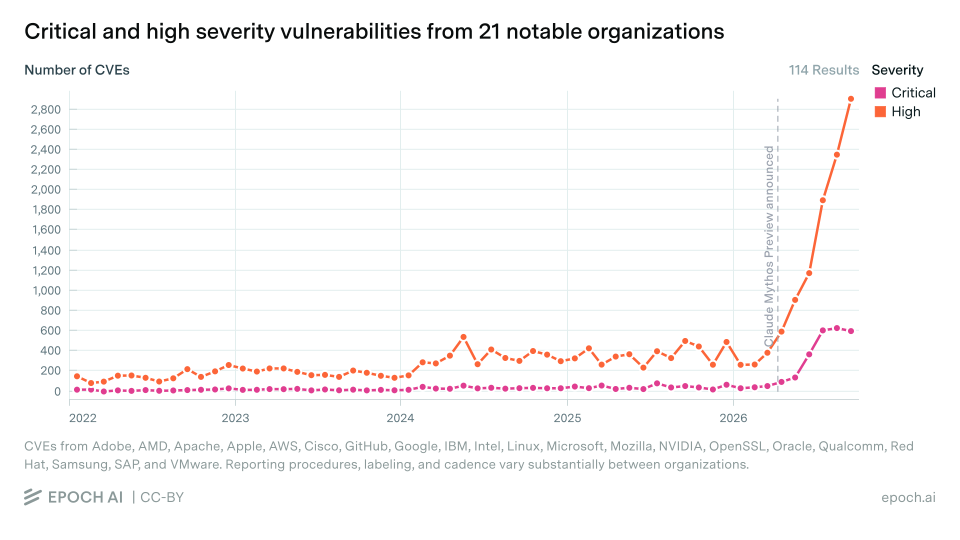
With AI tools, scanning millions of lines of code for bugs is faster and cheaper than ever. Defenders benefit, finding and fixing flaws sooner, but so do attackers. The result is that vulnerabilities are being disclosed at a far higher rate than a few years ago, and the time between a flaw's public disclosure and the first attempts to exploit it has shrunk: sometimes it's days; sometimes, hours.
The warnings also come from inside the AI industry. Anthropic unveiled its Mythos Preview model in April 2026 and, according to Epoch AI, said that by May 22 it had already been used to identify more than ten thousand high- or critical-severity bugs, not all of them disclosed. And Dario Amodei, Anthropic's CEO, lays out a risk scenario in his essay "We Must Pace the Frontier": he worries that within 6 to 12 months a swarm of AI agents could take control of much of the internet with a persistent network of compromised machines, causing hundreds of billions of dollars in damage. It isn't a fact or a firm prediction, but a risk the author considers plausible.
Jason Clinton, Anthropic's deputy chief information security officer, struck a similar note. According to Brodersen Dark News's account of a panel at DEF CON 2026, he said the next "18 to 24 months" could be the most intense of cybersecurity professionals' careers. And in October he wrote on X, according to WION and other outlets, that attacks are "going to get a lot worse before they get better" and that we need to hold on for about 18 months. It's his forecast, not a confirmed timeline.
Anthropic itself has acknowledged a case of this kind. According to Infobae, in the filing it submitted to the SEC for its IPO, the company reported that four of its models gained unauthorized access to real third-party systems during a cybersecurity exercise misconfigured by an outside partner, and that it found no evidence of coordination between the models or of attempts to evade oversight.
The numbers
Public figures show the jump. According to "CVE statistics" by Daniel Christensen, a tool that queries the US National Vulnerability Database (NVD, run by NIST) daily, as of October 30, 2026:
| Period | Vulnerabilities published | Average per day |
|---|---|---|
| All of 2025 | 49,972 | about 137 |
| 2026, January 1 to October 30 | 91,567 | about 302 |
Using a different base, the CVE program's, Guru Chahal's analysis, with data through October 25, 2026, shows the same thing month by month:
| Period | Monthly average | Monthly average, critical severity |
|---|---|---|
| November 2024 to October 2025 | 3,871 | 328 |
| July to September 2026 | 12,305 | 1,558 |
That's more than triple the monthly disclosures, and nearly five times as many critical ones. Brandefense reaches a similar average from the NVD for July to September 2026 (12,320 a month, per its data as of October 26). A caveat the sources themselves make: the rise coincides with AI-driven bug hunting, but their data doesn't show it's the cause.
Why periodic maintenance no longer cuts it
For years, the usual model was to review and update servers at set intervals: a monthly or quarterly maintenance window. If a fix comes out on a Monday and the next window is three weeks away, the system stays exposed that whole time, right when the most people know how to attack it.
That's why maintenance is moving from periodic to continuous. It's now normal for several relevant security updates to appear on the same day, and each one demands a quick decision on whether it applies, when to install it and how to confirm it worked.
A real case: two critical PHP vulnerabilities
In October, PHP, the language behind a huge number of websites and web applications, released fixes for two critical vulnerabilities, known as PHP2Shell, that allowed remote code execution without authentication: in practice, someone on the internet could take control of an application without a password.
The case shows the new pace well. According to The Register and TechTarget, the flaws were found with AI help: the firm Calif found one using an OpenAI model, and Wiz found them independently with tools that included AI models; TechTarget quotes Wiz saying a single researcher did in a week what would previously have taken a world-class team months. Amazon recorded an exploitation attempt in its honeypots four days before the public announcement. After disclosure, Cloudflare's CEO reported on X that blocked attack attempts had gone from thousands to millions, and Imperva counted, according to TechTarget, more than 480,000 attack requests against some 22,000 sites in 103 countries in 24 hours.
Several governments took websites offline as a precaution while applying the fixes. According to The Register, the UK technology minister told the House of Lords that 32 government services were unavailable and four partly unavailable, with no confirmed compromise of central government systems. Finland also took public sites offline preventively, and outlets including The Register and TechTarget reported similar steps in the Netherlands, France, Germany, Belgium and the Czech Republic.
And there were confirmed intrusions. According to the firm Dream, whose findings Palo Alto Networks' Unit 42 independently verified according to The Register, attackers Dream suspects are Chinese, with no confirmed attribution, built their own PHP2Shell exploit, chained it with a second flaw and took full control of 25 devices in the United States, Japan, Taiwan and South Korea. Most were firewalls with their management interface exposed to the internet, including systems in a US government-affiliated environment. Dream found AI tools on the attackers' infrastructure, though no direct evidence that AI wrote the exploit. The US cybersecurity agency (CISA) added the PHP2Shell flaws to its catalog of actively exploited vulnerabilities. The lesson is twofold: what gets disclosed gets exploited, and a management interface should never be open to the internet.
Here's how we responded on our servers:
- Find out what was really running. First we identified which PHP version each application was actually running. Looking at the package installed on the server isn't enough, and neither is pulling an image tagged "latest": an application may be using a different version.
- Back up before touching anything. We backed up configurations, databases and files.
- Mitigate while there was no fix. Until the fixed builds were published, we applied a temporary mitigation.
- Update the same day. As soon as the fixed versions were released, we installed them that same day.
- Verify at runtime. We checked in the running processes and containers that the new versions were the ones in use, not just installed.
Afterwards we set up periodic automated checks that look for the fixed version, back up before updating, validate that everything still works and roll the change back if validation fails.
Over the following days we also updated the content management system, the operating system, the container engine and the deployment tools, as verifiable versions became available. That's where a case worth telling came up: one part of the system still pointed to the old version, even though the system was already running the new one. We caught it during verification and fixed it. It's the best example of why installing isn't enough: you have to check what's actually running.
What continuous maintenance means
Keeping a server protected is no longer just "installing updates". It's four tasks that repeat all the time:
- Monitor. Know, as soon as a vulnerability is published, whether it affects anything you have running. That takes an up-to-date inventory of what software runs where.
- Patch. Apply the fix quickly, prioritizing what's exposed to the internet and what handles sensitive data. There are two cases to tell apart. For a vulnerability posing imminent danger, with a recommendation to patch immediately, the fix goes in within minutes or a few hours. Routine updates, on the other hand, are best installed after a few hours, once the community has confirmed they're sound: sometimes an update turns out to be fake or infected, and being the first to install it is a risk too.
- Verify what's actually running. Having the fixed package installed doesn't mean the service is using it: many programs keep running the old version until they're restarted. Verification has to look at what's running, not just what's on disk.
- Be able to roll back. Any update can break something. Backups and a tested way back let you patch quickly without fear of leaving the service down.
Why automate monitoring with agents
Doing these four tasks by hand, several times a day and across many machines, doesn't scale. Here AI helps defenders too: software agents that constantly review security advisories, match them against what each system has running, and prepare or support patching as soon as a fix is released.
At ITLab we already work this way: we have a team of agents dedicated to monitoring vulnerabilities and supporting patching as soon as fixes are published. When a vulnerability poses imminent danger, we apply the fix within minutes or a few hours; we never wait a day.
The agents don't work alone. Each one operates with limited context, and none has a global view of the system. That view is the human part: a person assigns the agents their tasks, reviews what they do, follows security news and understands how the whole system is built. Automation shortens the time between advisory and action, which is exactly what AI is shortening on the attackers' side; human judgment decides what to do and responds when something goes wrong.
No process guarantees absolute security. What you can control is the speed and discipline of the response.
Nothing is infallible: the other half is being able to recover
Monitoring and patching reduce risk, but they don't eliminate it. Today any system can suffer an attack, a human error or a failure that ends in data loss. That's why security needs two things at once: dedicated resources to monitor and patch without letting up, and a solid strategy so that, if something happens, the data stays available and intact.
A backup and data-custody strategy that's up to the task includes:
- Copies kept apart from the main system. A backup stored on the same server, or reachable with the same credentials, goes down with it.
- Version history. Being able to go back to how the data looked yesterday, last week or last month, not just to the latest copy, which may already be damaged.
- Immutable backups. Copies nobody can change or delete for a set period, not even someone who takes control of the server. They're the direct defense against attacks that encrypt or wipe the backups too.
- Encryption. So a stolen copy is useless to whoever stole it.
- Tested restores. A backup that's never been restored is a promise, not a guarantee. Regularly test that the data comes back complete, and measure how long it takes to get the service running again.
At ITLab we follow this logic: our data is copied more than once, across different local machines and drives, and also to the cloud.
What to ask your IT provider
If your company runs servers on premises, in the cloud or managed by a third party, these questions help you tell whether maintenance is keeping up with today's pace:
- How long do you take to apply a security fix after it's published? Urgent ones should go in within minutes or hours; the rest, after a brief check that the update is sound.
- Do you keep an up-to-date inventory of what runs on our systems? Without one, there's no way to know what each advisory affects.
- How do you verify that a fix is active, not just installed?
- What happens if an update breaks something? Are there tested backups and a rollback procedure?
- Do you monitor security advisories continuously, or only during maintenance windows?
- Do you tell us what was updated and when?
- Where are our backups, and are they kept apart from the main system?
- Are the backups immutable? In other words, could someone who took control of the server delete or encrypt them?
- When was the last restore test, and how did it go?
- If we lost the server, how long would it take to be back in operation, and how much data could we lose?
What your company can do to prevent and recover
- Keep everyday devices and software up to date too: computers, phones, browsers and your website.
- Limit what's exposed to the internet to what really needs to be.
- Require separate, immutable, encrypted backups, and ask for their restore to be tested regularly.
- Use two-factor authentication for email, admin systems and remote access.
- Decide who responds to an incident before one happens.
Frequently asked questions
Does AI make systems less secure? It doesn't make them weaker, but it speeds up the discovery of their flaws, for defenders and attackers alike. That forces a faster response.
How often should a server be updated? There's no fixed schedule anymore: relevant security fixes should be applied as soon as they come out, with priority for anything exposed to the internet.
Is installing updates enough? No. You have to confirm that services are running the fixed version and have a way to roll back if something fails.
If I monitor and patch, do I still need backups? Yes. No system is infallible, and separate, immutable, tested backups are what let you recover if an attack or an error does happen.
What is an immutable backup? A copy that can't be changed or deleted for a set period, even with full access to the server. It protects against attacks that try to destroy the copies too.
Should every update be installed as soon as it's out? Urgent security ones, yes. Routine ones are best installed after a few hours, once the community has confirmed they're sound, because sometimes an update turns out to be fake or infected.
What does ITLab do about it? It runs agents that continuously monitor vulnerabilities and support patching as soon as fixes are published. A person directs and reviews that work: the agents operate with limited context, and the global view of the system is human. On top of that, our data is backed up more than once, on local machines and in the cloud.
Sources
- Brandefense, "CVE Statistics 2026: Why Vulnerability Volume Is Surging" (October 2026), using NIST NVD data.
- Guru Chahal, "CVEs by the numbers" (October 2026), using CVE program data.
- Dario Amodei, "We Must Pace the Frontier" (September 2026).
- Epoch AI, "Data on cyber vulnerabilities" (updated October 30, 2026), CC BY 4.0 license.
- Daniel Christensen, "CVE statistics" (NVD data as of October 30, 2026), CC BY 4.0 license.
- Brodersen Dark News, on Jason Clinton's DEF CON panel (in Spanish) (August 2026).
- WION, on Jason Clinton's warning (October 2026).
- Infobae, on Anthropic's SEC filing (in Spanish) (October 2026).
- The Register, on PHP2Shell and UK government services (October 2026).
- TechTarget, PHP2Shell timeline (October 2026).
- Dream, "Chained PHP2Shell Exploit Roots 25 Servers" (October 2026).
- The Register, on the campaign that compromised 25 servers (October 2026).
More in this series
- Cybersecurity in Chile: PHP2Shell, ransomware and the laws ahead
- What a patch can't fix: hardware vulnerabilities
Contact
If you'd like to review how your organization's servers are maintained, or move maintenance to a continuous model, ITLab can help. Contact us.
Updated on October 30, 2026.
Do you need someone to take care of your technology?
Tell us what you need to organize, protect or solve. The first conversation has no cost: we assess whether our model fits you and what the next steps would be.
Let's talk about your business